

With more than 40 years of age and a global user base of more than a billion users, Excel has become a real success story for Microsoft.
Continue reading below the TLDR comic strip.
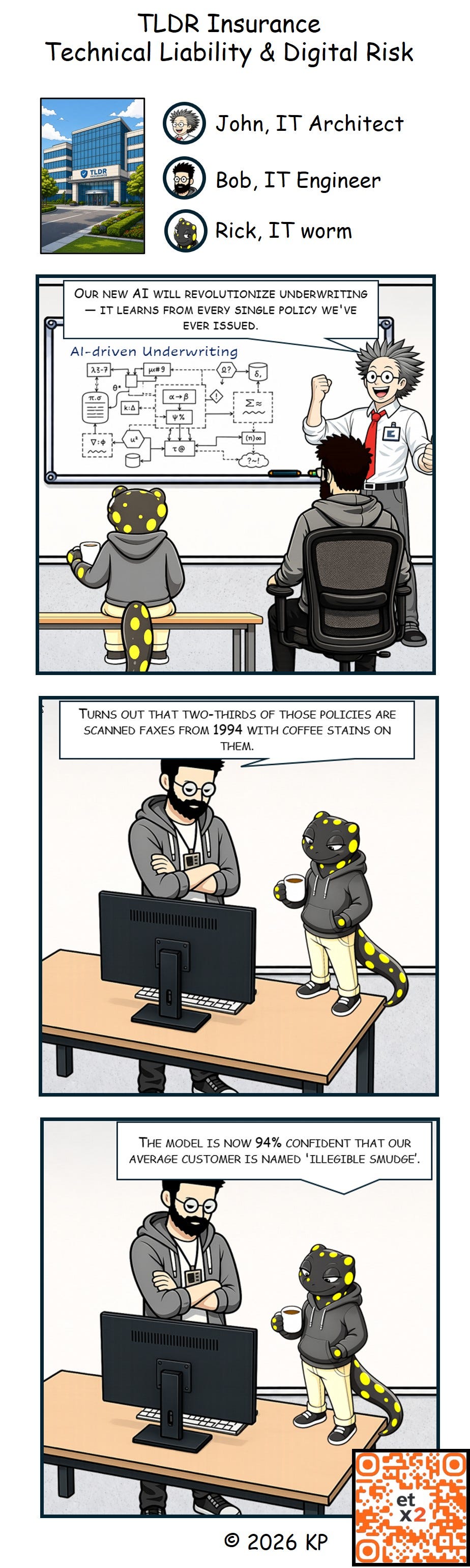
Business users love Excel for its simplicity, flexibility and ability to automate calculations and handling with data. It has become an ever-recurring pattern: A business analyst needs a simple spreadsheet. The results and speed of implementation are convincing to management. Not long after, the spreadsheet has macros, pivot tables and references to other Spreadsheets and is deeply embedded in business processes.
Excel solutions and their challenges
In no time, the simple spreadsheet has become a piece of the company’s critical business infrastructure with business logic and data transformation rules. It’s a business application but very often without proper testing, documentation and version control.
Often, the solution is tied immediately to its creator – and becomes a risk when the creator retires or leaves the business.
Auditors are watching these types of critical business applications very carefully nowadays. The risks associated with them cannot be ignored anymore. The JPMorgan Chase “London Whale” issue with more than $6 billion losses issue is long ago, but the root causes are not really solved.
Spreadsheet Variations
Not every spreadsheet is the same. This sounds trivial, but it is one of the reasons why Excel governance is so difficult in practice. A simple worksheet used for a one-time calculation has a completely different risk profile than a workbook that calculates quarterly reserves, prepares regulatory reporting, or drives operational decisions.
In most enterprises, spreadsheets exist in many variations. Some are simple lists. Some are calculators. Some are reporting layers on top of exported data. Some are planning models with dozens of assumptions, scenarios, and manual adjustments. Others are closer to full business applications: they contain structured input forms, pivot tables, formulas, hidden sheets, Power Query transformations, macros, external links, database connections, and sometimes even custom add-ins.
This spectrum matters. A workbook that only stores temporary notes may not require formal governance. A workbook that produces numbers used in financial reporting, pricing, forecasting, risk management, or customer communication clearly does. The problem is that the transition between these categories is usually gradual. Nobody starts with the intention to build an uncontrolled business-critical application. It simply happens.
The typical lifecycle is familiar: first, the spreadsheet solves a local business problem. Then more users start relying on it. Then formulas are extended. Then data is imported from another system. Then macros automate repetitive steps. Then management asks for additional reports. Users save files with modifications in different locations. At some point, the spreadsheet is no longer just a file. It has become an application — but without the lifecycle management normally expected from an application.
This is why the first governance question should not be: “Do we allow Excel?” That question is too broad. The better question is: “What type of spreadsheet are we looking at?” A lightweight classification model can help:
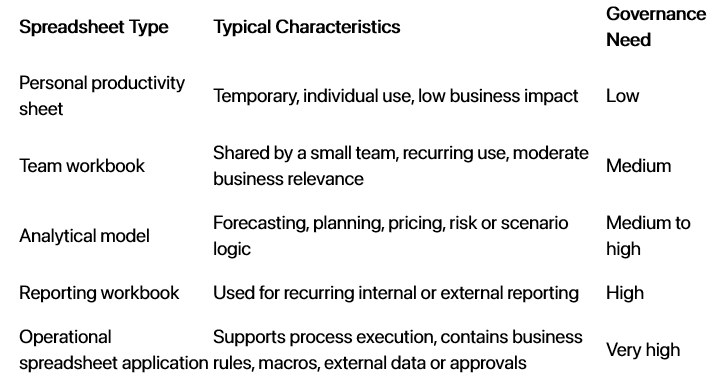
This classification is important because spreadsheet risk does not come from Excel itself. It comes from the mismatch between the business relevance of the workbook and the controls applied to it.
Embedded Data
A spreadsheet is rarely just a calculation surface. It is also a data container. And this is where many enterprise risks begin.
Business users often copy data into Excel because it is convenient. They export data from ERP systems, CRM systems, data warehouses, reporting tools, email attachments, SharePoint lists, and operational platforms. The exported data is then adjusted, enriched, filtered, corrected, and combined with other data. From a business perspective, this is practical. From a data governance perspective, it creates a parallel data universe.
Once data is embedded in a workbook, several questions become difficult to answer. Where did the data originally come from? When was it extracted? Has it been modified manually? Which version is the correct one? Are there hidden rows, filters, overwritten formulas, outdated lookups, or hard-coded assumptions? Is personal or confidential data stored in a file that is forwarded by email or saved locally?
The risk is not only that data may be wrong. The bigger issue is that the data lineage becomes invisible. A number in a spreadsheet may look precise, but its origin may be unclear. A workbook can mix current system data, historical extracts, manual overrides, assumptions, and copied values in the same calculation chain. Without explicit documentation, even the workbook owner may struggle to explain the exact path from source data to final result.
Embedded data also creates reconciliation problems. If a spreadsheet contains a local copy of data from a core system, the spreadsheet starts aging immediately after the export. Reports based on this copy may diverge from the official source. Different teams may use different extracts, different assumptions, and different manual adjustments. The organization then spends time explaining differences instead of managing the business.
Modern Excel technologies can reduce some of this risk, but they do not remove it automatically. Power Query, Office Scripts, Python in Excel, xlwings, VBA, and Office.js all allow richer interaction with data, but they also introduce new dependency chains. Python in Excel, for example, is powerful for analysis and machine learning, but the report notes that it runs in secure Azure cloud containers and is not designed as a replacement for process automation or system integration. Office.js provides cross-platform add-in capabilities, but the report also highlights platform fragmentation and production stability concerns.
The governance principle should therefore be simple: business-critical spreadsheets need explicit data lineage. For each critical workbook, it should be clear which data sources are used, how data is imported, which fields are transformed, where manual input is allowed, and which outputs are used in downstream processes.
Algorithms
Many spreadsheets contain algorithms, even if nobody calls them that.
A pricing formula is an algorithm. A reserve calculation is an algorithm. A risk score, allocation key, planning assumption, reconciliation rule, or eligibility check is an algorithm. In traditional software development, this logic would be implemented in application code, reviewed, tested, versioned, and documented. In Excel, the same logic may be distributed across thousands of cells, named ranges, lookup tables, hidden worksheets, Power Query steps, VBA modules, Office Scripts, Python cells, and add-ins.
This makes Excel powerful. It also makes it dangerous.
Spreadsheet algorithms are often highly transparent at the beginning. A business expert can see the formula, adjust it, and immediately inspect the result. This is one of Excel’s greatest strengths. But transparency declines as complexity grows. Nested formulas become difficult to read. Copy-and-paste logic creates inconsistent formula ranges. Hidden sheets hide assumptions. Macros turn visible logic into procedural code. External links create dependencies that users may not understand. Add-ins can move important logic outside the workbook completely.
The technology landscape reinforces this point. VBA is still deeply entrenched, but according to studies is declining, security-sensitive, and often poorly maintained, with high rates of unmaintained and undocumented production code. VSTO is effectively deprecated for new development, with migration to Office.js requiring a rewrite rather than a simple conversion. Python in Excel and xlwings open attractive options for analytical and statistical models, but they also shift algorithmic logic into Python code that needs its own testing, packaging, dependency management, and review.
For business-critical spreadsheets, formulas and macros should therefore be treated as production logic. The relevant question is not whether the logic lives in a “real application” or in Excel. The relevant question is whether the output influences real decisions.
A mature organization should know which spreadsheets contain material business logic. It should define owners for that logic. It should test important calculations with known input and expected output. It should document key assumptions. It should apply peer review to material changes. And it should avoid the worst possible pattern: business-critical algorithms understood by only one person, stored in one workbook, on one network drive.
Solution Development Governance
The uncomfortable truth is that many Excel solutions are developed like prototypes but used like production systems.
This is not a criticism of business users. In many cases, Excel solutions exist because central IT was too slow, too expensive, or too far away from the business problem. Excel gives business experts the ability to solve real problems quickly. That capability should not be removed. But once an Excel solution becomes important, its development model needs to change.
Solution development governance for Excel should not mean forcing every workbook into a heavyweight software delivery process. That would be unrealistic and would destroy the agility that makes Excel valuable. Instead, governance should be risk-based. Low-impact spreadsheets can remain lightweight. Critical spreadsheets need controls that are closer to application lifecycle management.
Excel Customization Technologies
Excel is not just a spreadsheet. Over decades, it has become a development platform. Business users can start with formulas and pivot tables, but very quickly Excel solutions can grow into something much richer: automated workflows, custom user interfaces, external data connections, add-ins, scripting logic, and even machine-learning-enabled analytical models.
This is one of the reasons why Excel remains so powerful in enterprises. It gives business experts a way to build solutions without waiting for a full software development project. But it is also one of the reasons why Excel creates governance challenges. The more customization technologies are used, the more the workbook behaves like an application — and the more it needs architecture, testing, security review, versioning, and lifecycle management.
The main Excel customization technologies each come from a different era and solve a different type of problem.
VBA: the enterprise survivor
VBA is the classic Excel automation technology. It allows users and developers to automate workbook actions, create user forms, manipulate cells, connect to files and databases, and implement procedural business logic directly inside Excel.
For many enterprises, VBA is still everywhere. It is embedded in pricing tools, reporting packs, reconciliations, planning models, actuarial models, financial close processes, and countless departmental applications. The reason is simple: VBA works, it is available inside Excel, and it allowed business users to solve problems long before modern low-code platforms existed.
But VBA is also a major source of technical debt. The attached report describes VBA as declining but still deeply entrenched. It notes low current developer adoption, widespread unmaintained production code, security concerns, and lack of documentation in many legacy VBA estates.
The problem with VBA is not that it is technically useless. The problem is that many VBA solutions were never treated as software. They often have no source control, no test suite, no deployment process, no ownership model, and no formal handover. A macro that started as a convenience can quietly become a critical calculation engine.
For existing VBA solutions, the right strategy is usually not immediate replacement. Large-scale rewrites are risky and expensive. Instead, enterprises should classify VBA workbooks by business criticality. Low-risk macros can remain as-is. Critical VBA applications should be documented, tested, secured, and gradually modernized where there is a strong business case.
VSTO: powerful, but strategically outdated
Visual Studio Tools for Office, or VSTO, was Microsoft’s enterprise-grade way to build Office add-ins using .NET. Compared with VBA, VSTO gave professional developers better tooling, stronger integration with Visual Studio, access to the .NET ecosystem, and richer user interface options.
For Windows-based enterprise environments, VSTO was once a strong choice. It allowed developers to build sophisticated Excel add-ins, connect to enterprise systems, create custom ribbons and task panes, and integrate Excel into broader application landscapes.
But VSTO has a strategic problem: it belongs to the Windows desktop era. It does not fit well with today’s cross-platform Office world, where Excel runs on Windows, Mac, browser, and mobile. The attached report describes VSTO as effectively deprecated for new development and highlights that migration from VSTO to Office.js is not a conversion, but a rewrite.
This matters for enterprises because VSTO solutions may still be business-critical. They may work perfectly today, but they are not a future-proof investment. Organizations should therefore avoid new VSTO development and create a transition plan for important existing add-ins.
The key governance question is: which VSTO add-ins are still needed, and for how long? Some may be retired. Some may be replaced by web applications, Power Platform solutions, Office.js add-ins, or more standard Excel functionality. Others may have to remain in controlled legacy mode until the surrounding business process is redesigned.
Office.js: Microsoft’s cross-platform future, with operational risk
Office.js is Microsoft’s modern framework for building Office add-ins with JavaScript or TypeScript. Its main promise is cross-platform compatibility. A well-designed Office.js add-in can run across Excel on Windows, Mac, the Web, and potentially other Office environments.
This makes Office.js strategically important. It fits the modern Microsoft 365 architecture better than VBA or VSTO. It supports central deployment, web-based development patterns, task panes, dialogs, ribbons, and integration with external services. For enterprise software vendors and internal platform teams, Office.js is the official direction for modern Office extensibility.
However, the technology also introduces a different type of complexity. Instead of local desktop automation, developers deal with browser runtimes, manifests, web security models, API requirement sets, platform differences, deployment channels, and Microsoft 365 update behavior. The attached report highlights serious developer concerns around Office.js, including platform fragmentation, instability, silent breaking changes, and a very large theoretical test matrix across apps, platforms, browsers, update channels, and manifest types.
That does not mean Office.js should be avoided. It means it should be treated as a serious software platform, not as a quick macro replacement. Office.js is attractive when cross-platform reach, centralized deployment, and modern web integration are important. It is less attractive when the solution depends on deep local file system access, tight desktop integration, or highly stable low-level Excel automation.
For critical enterprise use cases, Office.js requires professional engineering practices: automated testing, telemetry, staged rollout, fallback processes, security review, and clear ownership. It may be the future of Excel extensibility, but it is not a free lunch.
Python in Excel: analytics, not automation
Python in Excel introduces a new category of customization. It brings Python-based data analysis directly into the Excel experience. This is highly relevant because many analytical workflows already combine Excel with Python, R, notebooks, or statistical tools.
The strength of Python in Excel is analytical depth. It allows users to work with Python libraries such as pandas, NumPy, scikit-learn, and visualization libraries inside an Excel-oriented workflow. For analysts, actuaries, controllers, data scientists, and technically skilled business users, this can be a major productivity improvement.
But Python in Excel should not be misunderstood as the new VBA. The attached report notes that Python in Excel runs in secure Azure cloud containers and is focused on data analysis, visualization, and machine learning — not on controlling workbook properties, accessing the local file system, or automating external systems.
This makes Python in Excel an excellent fit for analytical models, exploratory analysis, statistical calculations, and advanced visualization. It is not the right tool for replacing all macro automation or for building complex operational workflows.
From a governance perspective, Python in Excel also raises new questions. Which Python packages are used? Is the workbook dependent on cloud execution? Are results reproducible? How are analytical assumptions documented? Who validates the code? As with formulas and VBA, Python code inside Excel can become business-critical logic and should be governed accordingly.
xlwings and external Python automation
xlwings represents another approach: keep Excel as the familiar front end, but move automation and calculation logic into Python. This can be especially attractive for organizations that want to modernize complex VBA solutions without forcing users to abandon Excel immediately.
xlwings is a Python-Excel bridge with documented enterprise use cases in areas such as machine-learning UDFs, spreadsheet monitoring, education, banking, and actuarial process optimization.
The main advantage is architectural. Instead of burying all logic in workbook formulas and VBA modules, more complex logic can be implemented in Python, tested with standard software engineering tools, packaged, versioned, and integrated with broader data science ecosystems. Excel remains the user interface, while Python becomes the calculation and automation layer.
The trade-off is operational complexity. Python environments need to be managed. Dependencies need to be packaged. Deployment to end-user machines must be controlled. Security teams need to understand what code is running and where. This is not necessarily a problem, but it moves the solution from “spreadsheet customization” toward “managed application architecture.”
Modern Excel Solutions
Separate Data and Algorithms from Excel
Separate Data and Algorithms from Excel
One of the most effective ways to reduce Excel risk is not to remove Excel from the business process. It is to remove the most critical data and algorithms from the workbook.
This is an important distinction. In many enterprises, Excel is valuable because it is familiar, flexible, and close to the business user. People know how to filter, sort, compare, simulate, and adjust data in Excel. They can build scenarios, inspect intermediate results, and challenge assumptions. That flexibility is hard to replace with a rigid application screen.
But the same flexibility becomes dangerous when the workbook also becomes the system of record, the calculation engine, and the process control layer. Critical data should not live only in spreadsheet files. Critical algorithms should not be maintained only in hidden sheets, copied formulas, or undocumented macros. Excel can remain the interface, but the authoritative data and business logic should move to governed platforms.
A better architecture is to treat Excel as a frontend.
In this model, data is stored centrally in databases, data warehouses, lakehouses, or application systems. Excel connects to this data through governed interfaces: database queries, semantic models, APIs, Power Query, OData feeds, or add-ins. Business users can still work with the data in Excel, but the source remains controlled. Access rights, data quality rules, refresh logic, lineage, and auditability are handled centrally rather than separately in hundreds of workbooks.
The same principle applies to algorithms. Instead of embedding critical calculation logic directly in spreadsheet formulas or VBA modules, the logic can be implemented in a controlled backend service, database procedure, analytical model, Python service, actuarial engine, pricing service, or business rules API. Excel then calls the algorithm, displays the result, and allows users to inspect or simulate inputs.
This separation changes the role of Excel. It is no longer the place where everything is stored and maintained. It becomes the business workbench.
That has several advantages.
First, data consistency improves. Users no longer work on outdated extracts that were copied into a workbook weeks ago. They access centrally managed data with defined refresh rules and controlled permissions.
Second, algorithm maintenance becomes easier. When a pricing rule, risk formula, allocation method, or validation rule changes, it can be changed once in the central service instead of being manually updated in every workbook where the formula was copied.
Third, governance becomes more realistic. Databases, APIs, and analytical services can be versioned, tested, monitored, secured, and documented using standard IT practices. This is much harder when logic is scattered across worksheets, macros, and local files.
Fourth, business agility is preserved. Users do not lose Excel. They still get the environment they know. They can analyze data, build scenarios, create pivot tables, adjust assumptions, and prepare decision material. But the critical components are no longer hidden inside uncontrolled files.
A simplified target pattern looks like this:
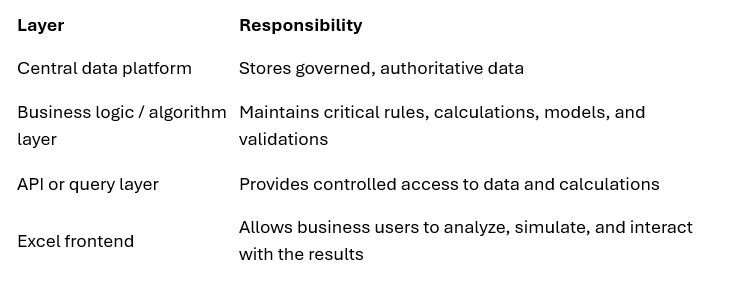
This pattern is especially useful for business-critical spreadsheets that have grown into operational tools. Examples include pricing workbooks, planning models, actuarial calculations, reconciliation tools, risk models, commission calculations, and regulatory reporting support files.
The goal is not to make every spreadsheet dependent on a complex backend architecture. That would be over-engineering. A small personal productivity workbook does not need an API. But once a spreadsheet contains critical data, recurring business logic, or outputs used for management decisions, the separation of frontend, data, and algorithms should be considered.
Modern Excel technologies support this direction in different ways. Power Query can connect Excel to governed data sources. Office.js add-ins can provide controlled interfaces to external services. Python-based approaches can move analytical logic into more maintainable code. VBA and legacy add-ins can also call databases and APIs, although they need stronger controls because of their security and maintenance risks. The important architectural principle is independent of the specific technology: Excel should consume governed data and services, not become the only place where they exist.
This also creates a better migration path. Instead of replacing an entire spreadsheet application in one risky step, organizations can gradually extract the most critical parts. First, move source data into a database. Then replace copied data with controlled queries. Then move complex formulas into a shared calculation service. Then reduce macros to orchestration logic or remove them completely. Over time, the workbook becomes thinner, safer, and easier to replace if needed.
This is often the most pragmatic modernization strategy. Business users keep the tool they trust, while IT gains control over the parts that matter most: data, algorithms, access, quality, and change management.
Excel remains powerful as a frontend. It should not always be the backend.
Choosing the right technology
There is no single best Excel customization technology. The right choice depends on the type of solution, the expected lifetime, the user base, the required integration depth, and the organization’s ability to support the technology.
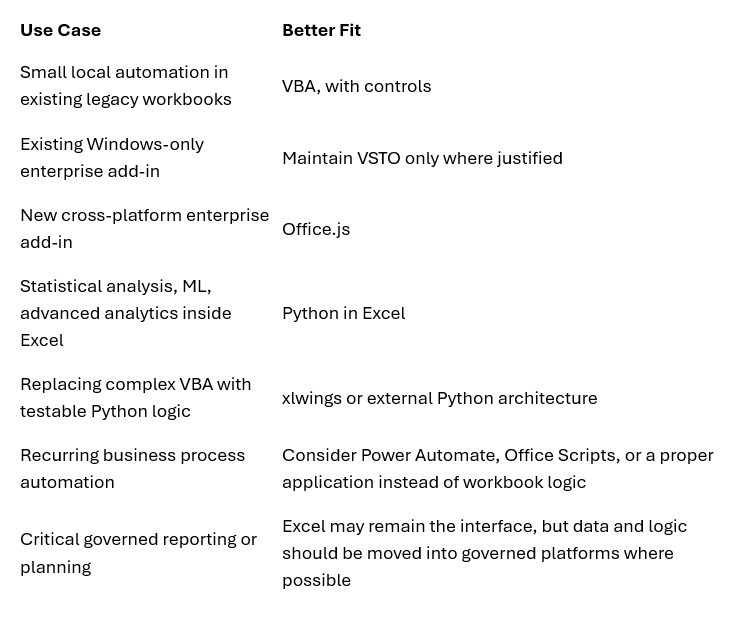
The broader lesson is that Excel customization is not just a technical topic. It is an application strategy topic. VBA, VSTO, Office.js, Python in Excel, and xlwings all allow organizations to extend Excel beyond the spreadsheet. But the moment Excel is extended, the organization must ask the same questions it would ask for any business application: Who owns it? Who tests it? Who secures it? Who maintains it? And what happens when it breaks?
Excel will continue to rule many enterprises not because it is perfect, but because it is close to the business problem. The challenge is not to stop business users from building solutions. The challenge is to recognize when those solutions have become important enough to deserve professional engineering and governance.
Important Governance Controls
At minimum, critical Excel solutions should have:
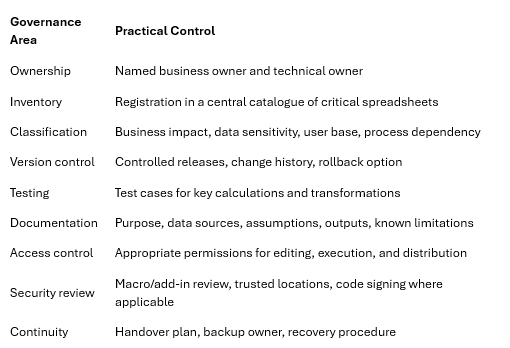
This type of governance is especially important because Excel extensibility is in transition. The report describes VBA as legacy but still widely present, VSTO as effectively deprecated for new development, Python in Excel as powerful but narrow, xlwings as useful for Python-based automation, and Office.js as the cross-platform direction but with real operational concerns. That means enterprises should not only govern existing workbooks. They also need technology decision rules for future Excel-based solutions.
A useful policy could be:
· For simple analysis, use standard Excel functionality.
· For repeatable data preparation, prefer Power Query or governed data pipelines.
· For business-critical automation, avoid unmanaged VBA where possible.
· For statistical or machine-learning analysis, consider Python in Excel or Python-based architectures.
· For enterprise-grade cross-platform add-ins, evaluate Office.js carefully, including testing effort, deployment model, supportability, and platform limitations.
The strategic goal is not to eliminate Excel. That would be unrealistic. The goal is to prevent uncontrolled Excel solutions from becoming invisible enterprise applications. Excel will remain part of the enterprise landscape because it is flexible, familiar, and incredibly productive. But when Excel is used as an application platform, it needs the same management attention as any other application platform.
A spreadsheet may start as a file. In many enterprises, it ends up as a system. Governance needs to start before that transition becomes invisible.